
How to check your own business profiles in an afternoon
 Katie LendelFounder & Strategic Marketing Lead
Before a new customer calls, books or walks in, there is a good chance they looked the business up. They typed the name into a search bar and clicked whatever came back. What they find there is your front door, whether or not you built it.
Most owners I talk to set their profiles up one at a time over several years. A Facebook page here, a directory listing there, a LinkedIn page somebody started for the business. Each one was right the day it went up. Then the hours changed, the logo changed, the website moved, and nobody went back to the others.
Here is how I check a business's public profiles in one afternoon. It is a customer's-eye pass: a private browser window, my phone and a plain notes page. I'll go through what I look for in each place, in the order I look.
Where I start: searching the name like a customer
I open a private browser window, so the results are not shaped by my own history. Then I search the business name, the name with the city, and the name with the main service. I keep going past the first page, because forgotten listings often sit further down.
Everything that turns up goes on one notes page, one line each, with three columns: where it is, the link, and whose login it sits under. The usual suspects:
- The website
- Google Business Profile, for businesses that are eligible for one
- Facebook, Instagram and LinkedIn
- The directories and review sites that fit the type of business
- Anything else that shows up under the name, including pages I did not expect
The login column often tells me the most. Sometimes a profile was started by a former employee, a freelancer or a web designer from a few years back, and nobody is sure which email it belongs to. I write that down as a finding before I even look at the content.
ScaleLounge takes this work off an owner's plate, from the strategy to the work itself. See how ScaleLounge works.
Names and descriptions: one business, told the same way
Names, letter by letter
I put every profile's name side by side on the notes page and compare them letter by letter. I'm looking for small things. An "and" on one profile and an ampersand on another. A shortened name on one platform and the full legal name on another. An old name left over from a rebrand. A founder's personal name on a page that is meant to be the business. Handles and usernames that spell the name three different ways.
To the owner, those are all the same business. To a stranger deciding quickly, a different spelling can read as a different company. I settle on one line, the name as the business uses it today, spelled exactly, and measure everything else against it.
Descriptions, read as one story
Next I read the short description on every profile, then the longer one on the website's about page. I am not looking for identical words. A LinkedIn page and an Instagram bio sound different, and they can. I am looking for the same story: what the business does, who it is for and where.
The giveaways I see most:
- A service the business stopped offering, still listed
- A customer type that no longer fits
- A tagline left over from an earlier version of the brand
- A description that stops mid-sentence
- A profile where the description was never filled in at all
Empty counts as a finding too. The test I use is whether a stranger who read every one of them would guess it was a single business.
Hours, address and phone: the details that go stale
Hours are the detail I see go stale first. They change for small reasons, a new day off, a seasonal schedule, a holiday, and every platform keeps its own copy. I check each profile against the schedule that is true at the door today.
Holiday hours slip most often, and the holidays are when a wrong time costs the most. Most platforms let a business set special hours for a specific day, so one afternoon can cover the weeks ahead.
Then the address and the phone. For the address, I look at suite numbers, an old location, and, for businesses that travel to their customers, whether a street address is showing when a service area would describe the business better. For the phone, I call the number once from my own phone and listen to where it goes. A number that rings a retired line, or a voicemail nobody checks, is a quiet way to lose a customer.
Links: every one, clicked
Every link on every profile gets clicked once, on a phone, and I watch where it lands.
Broken links are easy to spot. The ones I find more interesting are links that work but land somewhere the business would not choose. A website link can open an old address that still forwards but drops the visitor on the wrong page. A bio link can point to an offer that has ended. The social icons on the website can lead to profiles the business no longer uses.
I go in both directions, from each profile to the website and from the website to each profile. The second direction catches the icons in the footer that nobody has looked at since the site was built.
Photos: how they look on a phone
Last come the pictures. I look at the profile photo, the cover image and the logo on every profile, and I look on my phone first, because that is where many customers will see them. A round profile photo can crop the logo or cut off a face. A cover image can still be the holiday one months later. A storefront or team photo can be from before a remodel or a staffing change. A logo can be an earlier version of the current one. Any image can look soft or stretched.
Sorting the list, and where the free Online Presence scan fits
With the notes page full, I sort the lines into three groups: matches, small differences, and things a customer would notice. The third group comes first, which means wrong hours, a dead link, a phone number that goes nowhere. Names and descriptions come next, since they take a bit more thought. Photos come last. I keep the page afterward, so the next change, a move, a new service or a new logo, has one place to start.
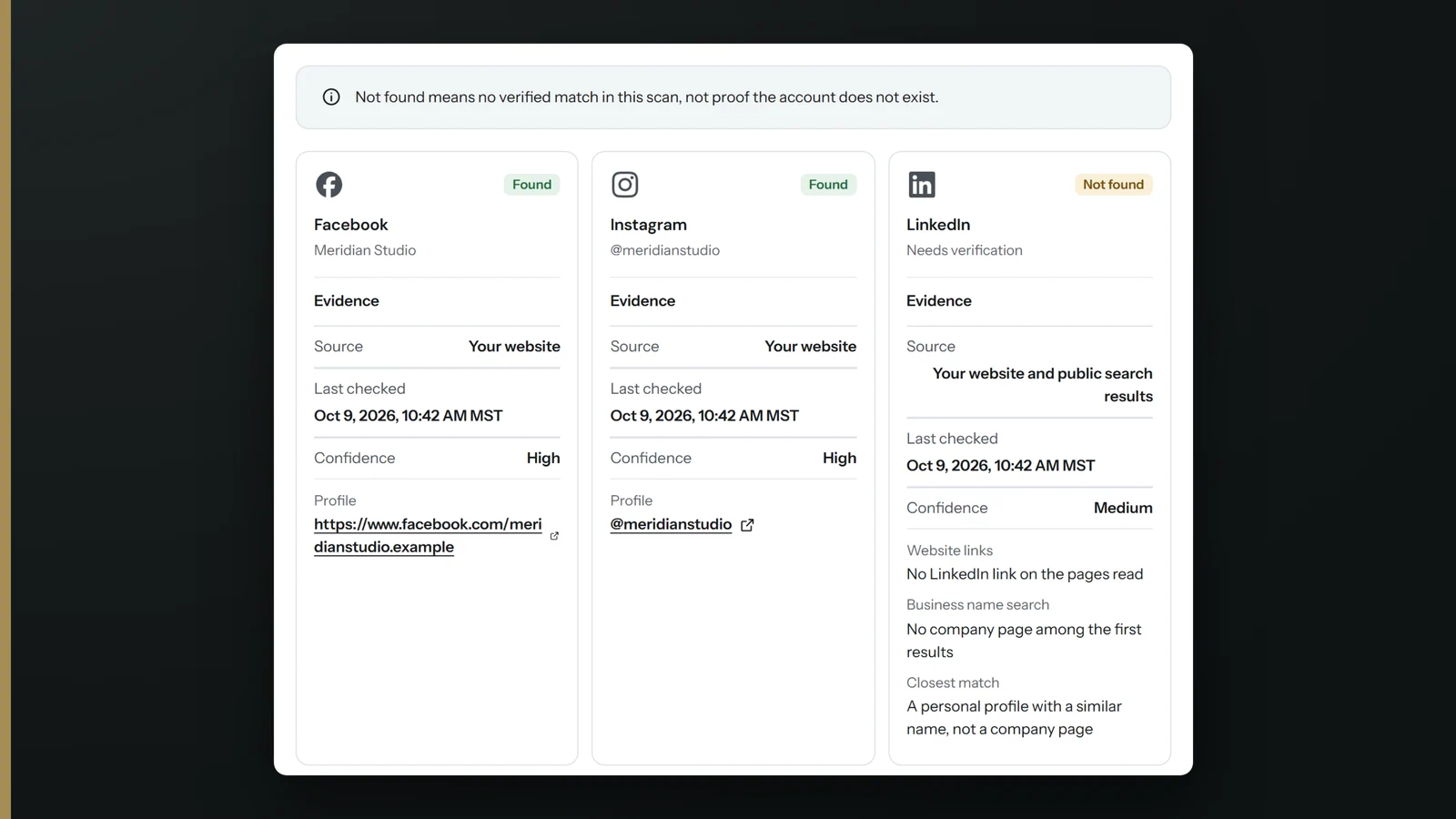
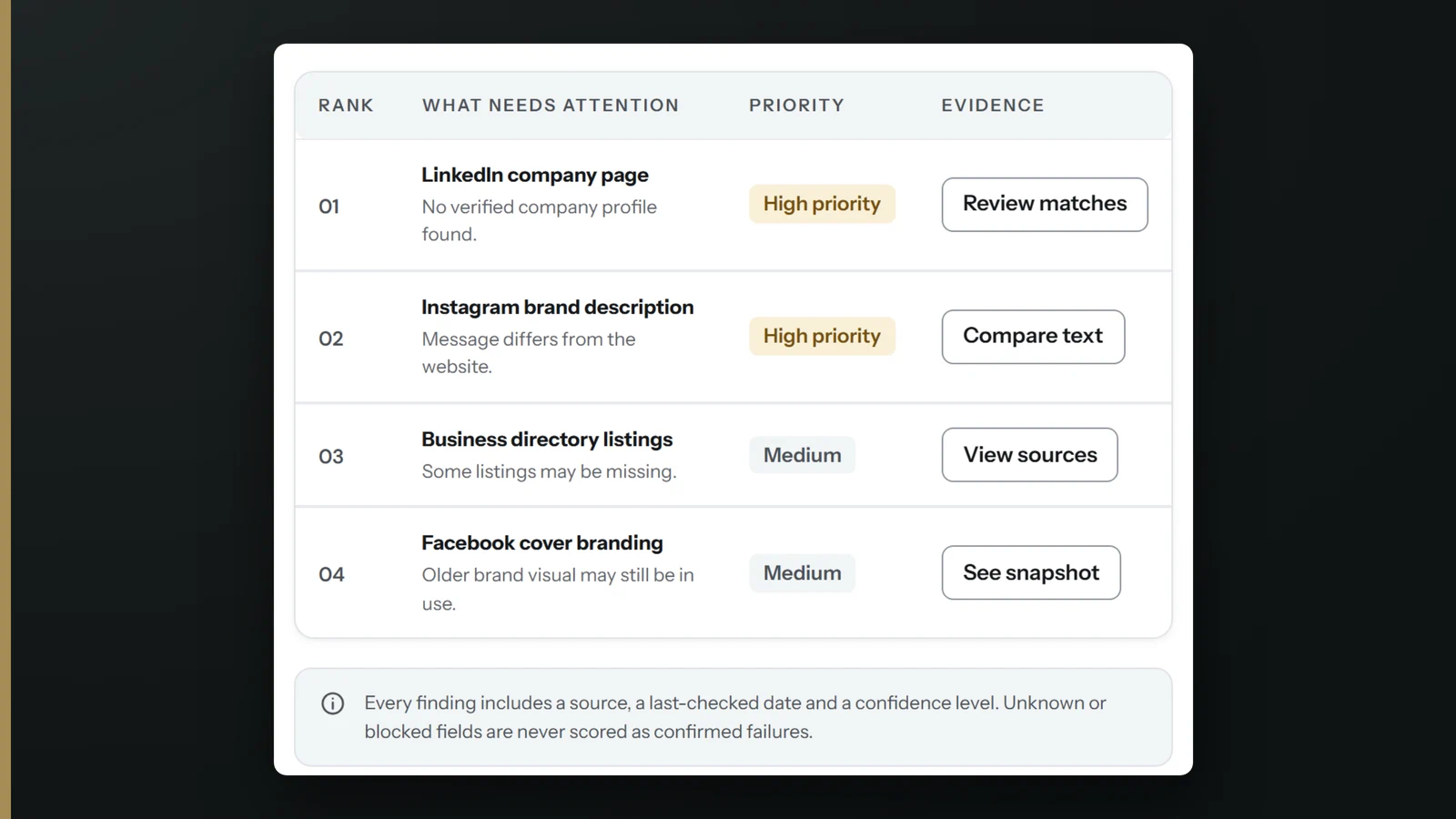
Doing the pass by hand is how I get to know a business's presence. It has gaps, too. I can only find what I think to search for, and a profile under an old name can slip by. The free ScaleLounge account includes an Online Presence scan: a scan of where a business already appears, with the public evidence behind each finding. Each finding carries its source, the date it was last checked and a confidence level, and something the scan cannot read is never scored as a confirmed failure. I think of it as a second pair of eyes after an afternoon pass, and as a starting point when the afternoon is hard to find.
Rather hand this off than add it to your week? That is what ScaleLounge is for. See what ScaleLounge handles.
FAQ
How long does it take to check your business profiles?
For a business with a handful of profiles, an afternoon is about right. Finding everything takes the longest, and the checks go quickly once the notes page exists. A business with many listings or several locations takes longer.
Which business profiles matter most?
I start with the website, the Google Business Profile for businesses that are eligible for one, and the one or two social profiles that customers actually use for that business. After those come the review sites and directories in the business's field.
What if I find a profile I did not create?
It happens, especially with listings that were started by a former employee or a vendor. Most platforms have a way to claim a listing or request a correction. I put the platform and the link on the notes page, so it does not get lost.
